// FREE VST3 PLUGIN · WINDOWS 64-BIT
Glitch in Time
Real-time glitch, stutter & texture engine for producers who don't wait for the drop — they detonate it. Six glitch modes, fully automatable, tempo-synced. Completely free.
What is Glitch in Time?
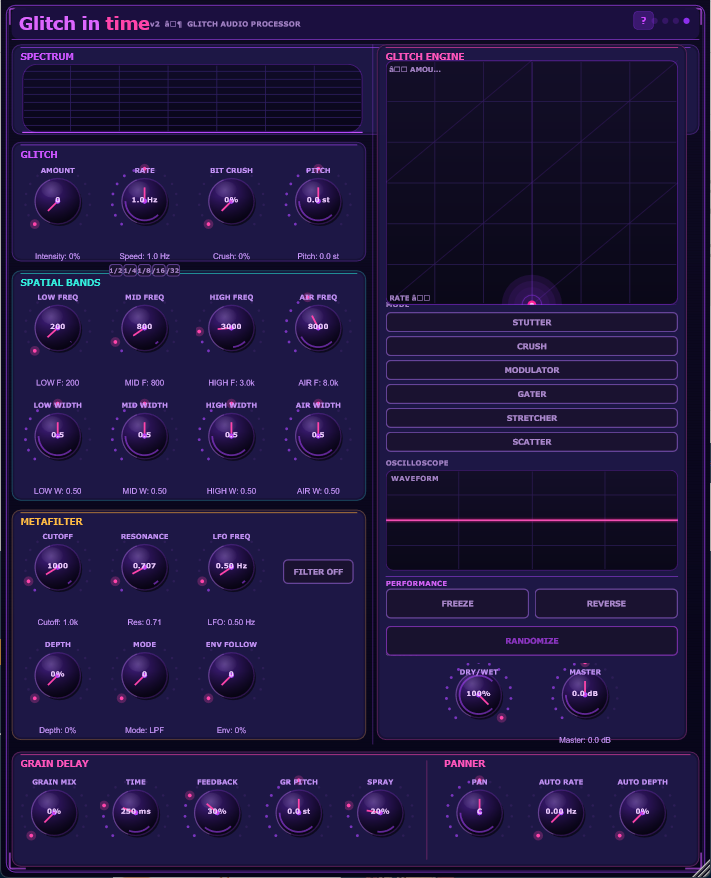
Glitch in Time is a free VST3 glitch plugin for Windows that lets you apply real-time glitch, stutter, crush, and scatter effects to any audio source inside your DAW. Whether you're producing electronic music, hip-hop, experimental, or sound design, Glitch in Time gives you six distinct glitch engines — all tempo-synced, all automatable, all free.
Unlike traditional glitch tools that work destructively, Glitch in Time processes audio in real time. You can fire glitch effects mid-performance, automate every parameter, and MIDI-map every knob for live control. It also includes a resonant metafilter with auto-wah, bit crusher, granular delay, and 4-band spatial width control — making it a complete glitch and texture processing suite in a single plugin.
Features
- 6 glitch modesStutter · Crush · Modulator · Gater · Stretcher · Scatter
- Tempo-syncedLock rate to 1/2 · 1/4 · 1/8 · 1/16 · 1/32 notes
- Metafilter + auto-wahLP/HP/BP · LFO · envelope-follower auto-wah
- Bit crusherClean 16-bit down to gritty ~1.5-bit
- Granular delayPitch, spray & feedback controls
- 4-band spatial widthStereo-width + auto-panner per band
- Full automationEvery knob automatable & MIDI-mappable
- MIDI triggerFire glitches & play the buffer from MIDI notes
System Requirements
Format
- VST3 (64-bit)
- Standalone application
Compatible DAWs
- Ableton Live
- FL Studio
- Reaper
- Cubase / Nuendo
- Studio One
- Bitwig Studio
- Any VST3 host
System
- Windows 10 / 11
- 64-bit only
- ~5 MB download
- Intel or AMD CPU
Price
Free — forever
No account needed
Direct download
Frequently Asked Questions
Is Glitch in Time really free?
Yes, completely free — no account, no registration, no time limit, no watermark. Just download and use it in any project.
Which DAWs does Glitch in Time work with?
Any DAW that supports VST3 on Windows 64-bit: Ableton Live, FL Studio, Reaper, Cubase, Studio One, Bitwig, Cakewalk, and more. It also runs standalone without a DAW.
Does it work on Mac or Linux?
Currently Windows 10/11 (64-bit) only. Mac support is on the roadmap — join the waitlist to be notified.
What are the 6 glitch modes?
Stutter (buffer repeat), Crush (amplitude destruction), Modulator (ring/AM modulation), Gater (rhythmic gating), Stretcher (time-stretch glitch), and Scatter (random slice rearrangement). Each is fully tempo-synced.
Why does Windows SmartScreen warn me?
The installer is unsigned — common for indie audio plugins. Click "More info" then "Run anyway." The plugin is safe; you can verify the download against the file on our GitHub if you want to be certain.
Can I use it on a track, bus, or send?
Yes. Glitch in Time works on any audio channel — instruments, drums, vocals, buses, FX returns. Use it as an insert or layer it with automation for dynamic transitions.
Download Glitch in Time Free
v1.1.0 · VST3 + Standalone · Windows 10/11 · 64-bit · ~5 MB
Also check out our upcoming AI synthesizer
Explore VoidSynth →